

Did you know that you do not actually own your domain name? Even the most successful global brands only lease their web addresses for a set period. This reality makes the domain name life cycle one of the most important concepts for any site manager to understand.
If you miss a single renewal deadline, your website could go dark, your professional emails might stop working, and a competitor or cybersquatter could even purchase your brand name right out from under you.
Losing a domain is a logistical nightmare that can take weeks and hundreds of dollars to fix. It damages your search engine rankings and breaks the trust you have built with your customers. The good news, though, is that these disasters are entirely preventable. This guide will walk you through every stage of a domain's life so you can manage your digital assets with total confidence.
1. What is the Domain Name Life Cycle?
Stage 1: Registration and Active Ownership
Stage 2: Approaching Expiration
Stage 3: Auto-Renew Grace Period
Stage 6: Domain Becomes Available Again
2. The Global Variance: Not All Extensions Are Equal
3. Practical Tips to Avoid Losing Your Domain
What is the Domain Name Life Cycle?
The domain name life cycle describes the sequence of states a domain passes through over time. Each stage comes with different rights, limits, and risks for the domain owner.
The cycle starts when you register a domain and ends when the domain "drops" or becomes available to the public again. Between those points are several phases that allow renewal, recovery, or permanent loss.
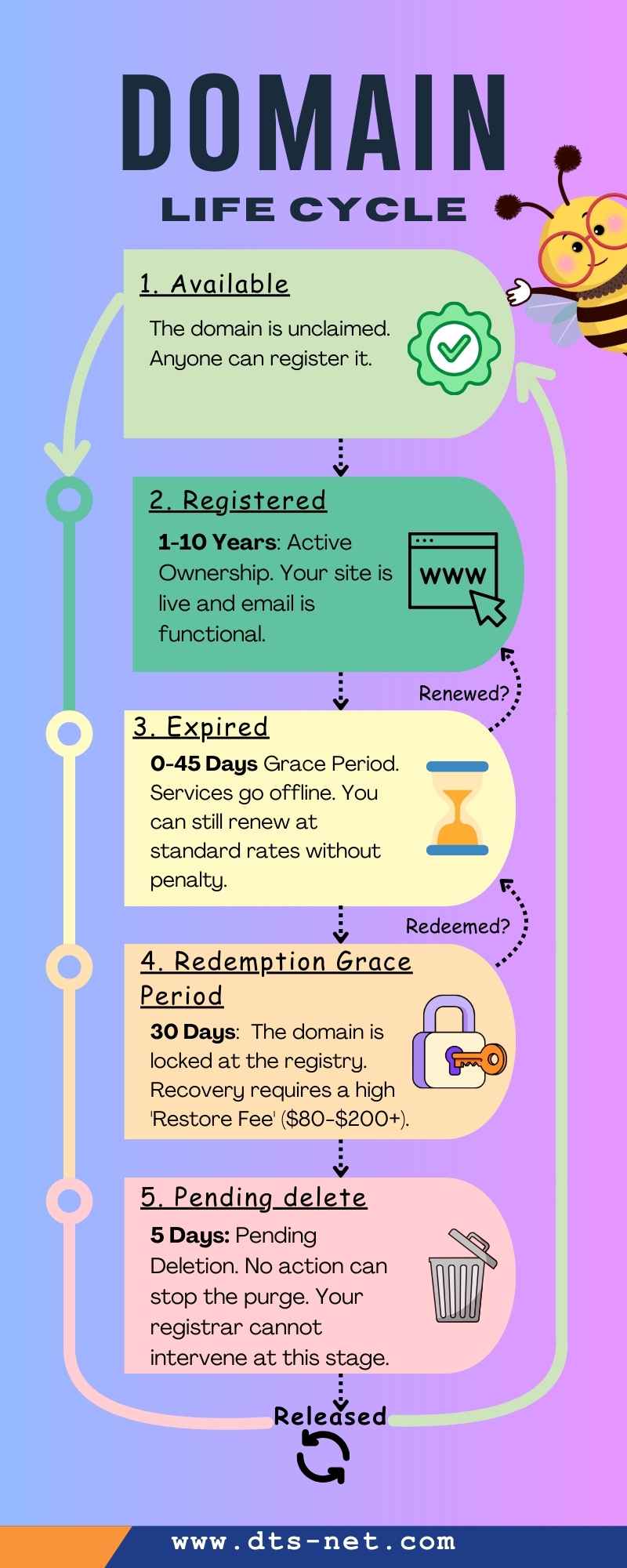
By understanding each stage, you will be able to avoid downtime, protect your brand, and make informed decisions when deadlines approach. The infographic below offers a visual overview at how these phases connect. We will break down the specific rules, costs, and risks of each stage in the sections that follow.
Stage 1: Registration and Active Ownership
The cycle begins with registration of a desired website address no one has claimed yet. Most people think of this as a simple purchase, but it is more like a long-term rental agreement with specific rules.
When you register a domain, you lease the right to use that name for a fixed period. It can range from one to ten years. Once reserved, the domain remains in active status. You can also renew it before it expires to extend the period you've registered to use it.
Also, registrars typically offer a very short window immediately after you register a new domain, usually about five days, called the "Add Grace Period". If you realize you made a typo in the domain name or registered the wrong extension, you can often delete the registration and get a refund during this time. Once this window closes, you are committed to the full term.
While your domain is active, you control how it works and where it points. This includes using it to host a website, email services, or manage DNS. You can also transfer the domain to another registrar or update ownership details if needed. During this healthy phase, a WHOIS lookup will typically show a status of 'ok' or 'active' based on standardized EPP status codes used across the industry.
Stage 2: Approaching Expiration
Before your domain expires, you can renew it at the normal price. Many registrars offer an auto renewal option. Once activated, your domain renews automatically if your payment details are still valid.
So, what happens if the domain expires without renewal? Your website will likely stop loading. A "parked" page from your registrar might appear instead. Your professional email accounts will also stop receiving mail. New messages won't be queued up. Instead, they simply bounce back to the sender. However, depending on your domain name type, you might still be able to reclaim it even if it expires, which we will go into deeper in the next section.
Stage 3: Auto-Renew Grace Period

When the registration term ends, most gTLDs like .com or .net enter the auto-renew grace period. If available, this part of the domain name life cycle often lasts between 30 and 45 days. However, the exact timing will depend on your registrar and domain type. You might notice the domain status change to 'clientHold' or 'renewPeriod' during this time, which is the technical signal that the registry has suspended your DNS services.
During this phase, the domain does not fully belong to anyone else yet. You can usually renew it at the normal renewal cost. Once renewed, services return to normal.
If you are looking for a deal or want to move to a better provider, transfers to a new registrar are still possible during the grace period. Transferring a domain typically adds an extra year of registration as part of the process. This acts as a clever alternative to a standard renewal, as you secure your name and move to a preferred registrar in one step.
If you ignore the grace period, the domain moves into a much more expensive and risky territory, as you are about to find out next.
Stage 4: Redemption Period
If the grace period ends without renewal or transfer, the domain enters the "Redemption Grace Period". It typically lasts for 30 days, but it represents a serious risk to your website because your registrar will return the domain to the central registry.
During this phase, the domain remains in a locked state. Not only are your website and email offline, but you also lose the ability to transfer the name to a new provider. If you run a search on your domain now, the record will clearly display the 'redemptionPeriod' status to indicate it is being held by the registry.
While you can still reclaim the domain during redemption, it is no longer a simple renewal. You must pay an extra "Restore Fee" to pull the domain back from the central registry. These costs often range from $80 to $200 and serve as a final warning before the domain moves toward the next phase of deletion.
Stage 5: Pending Delete
After redemption, the domain enters pending delete. This phase usually lasts five days. Your WHOIS domain search will also update the status to 'pendingDelete,' confirming that the name is now locked in the final purge queue.
At this stage, the domain cannot be renewed or restored. The registry removes it from normal use and prepares it for deletion. The worst part is that, no action from the previous owner can stop deletion. Your registrar support team cannot even intervene.
If a domain is in high demand, some registrars will auction it to the highest bidder before it ever becomes available to the general public. This allows new buyers to skip the "drop" process entirely.
Stage 6: Domain Becomes Available Again
Once pending delete ends, the domain drops from the registry and is released back to the public. At this point, anyone can register it on a first come, first served basis, and the domain life cycle repeats itself.
If it was a high value domain, you should not expect to simply buy it back at the regular price. Professional "drop-catchers" use automated software to monitor valuable domains. In other words, the second your domain becomes available, a bot might purchase it to sell it back to you at a massive markup or to host low-quality ads on your former brand name.
Some registrars offer domain backorder services. These attempt to register the domain the moment it becomes available. But backorders come with an extra cost and do not guarantee success, especially for high demand names.
Quick Recap
| Life Cycle Phase | Duration | Action Possible |
|---|---|---|
| Active Ownership | 1–10 Years | Full Control |
| Expired Grace Period | 0–45 Days | Renew or Transfer |
| Redemption Grace Period | 0–30 Days | Restore Only |
| Pending Delete | 5 Days | Backorder |
The Global Variance: Not All Extensions Are Equal
Everything we have discussed so far applies generally to "generic" extensions like .com, .org, and .net. However, country-code domains (ccTLDs) often play by different rules.
Extensions like .au, .de, or .co.uk are managed by different organizations in different countries. Some of these do not offer a grace period at all. If a .de domain expires, it might go straight to redemption or a different type of auction.
Always check the domain life cycle rules for your specific extension when you first register it. You can usually find this information in your registrar's knowledge base articles or in their domain policy.
💡 You Might Also Like: What is a Domain Name for a Website: Best Guide for Beginners
Practical Tips to Avoid Losing Your Domain
Knowing how the domain name life cycle works is a critical first step. However, true protection comes from being proactive, not just informed.
With just a few small habits, you can prevent most accidental domain losses. Taking these practical actions will ensure you never have to deal with the “Danger Zone” phases.
- Use a Third-Party Email for Your Account: Never use an email address associated with the domain you are registering for your registrar login. If the domain expires, you will lose access to your email and will be unable to receive the password reset links or renewal codes needed to fix the problem. Use a reliable service like Gmail or Outlook for your administrative contact.
- Set Up Payment Redundancy: Do not rely on a single credit card. Most registrars allow you to add a secondary payment method. If your primary card is declined because it expired or reached a limit, the system can automatically try the backup.
- Consider Multi-Year Registration: "Locking in" a domain for longer periods is often a smart move. It protects you against future price increases and ensures you do not have to worry about the renewal process every twelve months.
- Perform an Annual Audit: Set a calendar reminder once a year to log into your registrar. Check your contact details, verify your payment methods, and look at the expiration dates for all your domains. Five minutes of checking can save you days of recovery work.

What If You Missed Every Deadline? A Recovery Checklist
If your domain expired and services stopped, act quickly.
- Check the domain status in your registrar account.
- Contact support to confirm whether renewal or restoration is still possible.
- If the domain reached pending delete, look into backorder options.
- Monitor availability closely after deletion.
Even when recovery fails, understanding the domain name life cycle helps you plan next steps without guesswork.
Conclusion
The domain name life cycle is not just a technical timeline. It is a vital business process that dictates the safety of your online identity. While the system provides safety nets like grace periods and redemption windows, relying on them is expensive and stressful.
The most successful site managers treat their domains as foundational assets rather than "set and forget" tasks. By keeping your contact information current, maintaining backup payment methods, and understanding the phases of ownership, you ensure your brand stays where it belongs: under your control.
FAQs Related to Domain Name Life Cycle
If you’ve read a domain policy, you’ve probably seen these terms used together and wondered how they differ. The Registry is the organization that manages a specific extension like .com. On the other hand, the Registrar is the service provider where you lease the name. And of course, you are the Registrant, the legal entity with the right to use the domain during the lease term.
A domain backorder is a service that tries to register a domain for you as soon as it is released by the registry. The provider uses automated drop-catching systems to compete with other registrars attempting to claim the same name. In most cases, you only pay if the backorder is successful, and the fee usually includes the first year of registration. If multiple customers backorder the same domain, it may be awarded through a private auction.
A domain auction is where you can bid on a domain that someone else already registered on an online platform. You usually see auctions when a domain reaches certain points in its life cycle. A domain may be sold to the highest bidder after expiration during the pending delete stage or sooner, depending on its extension. If you own a premium, short, or brandable domain and fail to renew it, the name may end up in an auction once it expires. However, some owners can also choose to sell a domain name at auction.